Jul 16, 2026
FarmJam 2026 - Dev Log 1
Two days into FarmJam: themes dropped, I switched to LimeZu assets on day one, and got the project, event bus, mouse interaction, game state, day/night cycle, and player animations built. The bugs were the interesting part (an origin offset that put my interaction range on the farmer's hat, a tile boundary sampling issue, and camera smoothing causing jitter), and I'm about three days ahead of schedule.
Farm Jam Dev Log 1
Two days into the game jam, the themes dropped, I switched asset packs before writing a single line of code, and I spent most of last night fixing a bug where the players interaction range was centered on their hat.
Here's where we are, one day at a time.
First, the concept
It's almost a promised staple that any cozy farm game is going to have the shop keeper or secondary farm where you buy your supplies, seeds, and livestock from.
In this game (title still a work in progress), you are the shopkeeper. You order livestock and supplies from a catalogue, similar to how most retail stores get their stock from a distributor, these are items that the townspeople don't have access to locally. The catalogue has a shipping delay, you also have a bill due every five days that takes your store if you miss it. Between needing to raise animals to sell, waiting for new baby animals to come in via the distribution, and the relentless rental agreement for your store you must balance time, stock, and money to ensure you survive the season. If that weren't worrisome enough, sometimes mother nature fails to work in your favor.
Day 1 - 7/14 @ 11:00 PM EST
I got the email indicating the Jam had started, saw the secret themes were Eldritch Horror and Mushrooms. Brainstormed some ideas around those and what changes I could make to the concept to incorporate those.
The project started out simple enough, setup a new project within Godot, adjust project settings to fit the viewport and art style I wanted to go with. Easy right? Until I started second guessing my choice in asset packs.
I switched art and asset packs on day one
I'd planned to use Kenney's Tiny Farm, Tiny Town, and UI packs. I measured the Tiny Farm and Town packs and confirmed they were clean 16x16 grid with 1px separation, and had it importing correctly.
Then I found LimeZu's Modern Farm pack, and it has three things that Kenneys does not:
- Baby Animals
- Market Stalls
- Wheat with proper growth stages
All three are things I'd specifically designed around missing. My initial plan had been to represent animal age with an indicator icon instead of a sprite change. Now I don't have to do that.
Day one is the only day where that change costs me no time down the road, so thankfully I found these new assets now rather than later.
I also picked up LimeZu's Modern User Interface, it is also a 16x16 base and has elements I'll need that Kenney's did not, such as portraits for NPC's, dialog frames, shop UI elements.
What actually got built on day 1
Project Setup:
Viewport size, canvas settings, global input settings, and more.
Tilesets sliced:
All the LimeZu sheets measured clean at 16x16 with zero separation. I skipped the autotile setup, the pack ships with a Godot-formatted terrain file but for my use case setting that up by hand would take more time than just drawing the map itself.
Event Manager:
One script set to autoload with nothing but signal declarations for things like day_ending, bill_due, etc. At the end of day 1, this was just an initial setup, nothing was wired to it just yet.
Mouse Based Interaction:
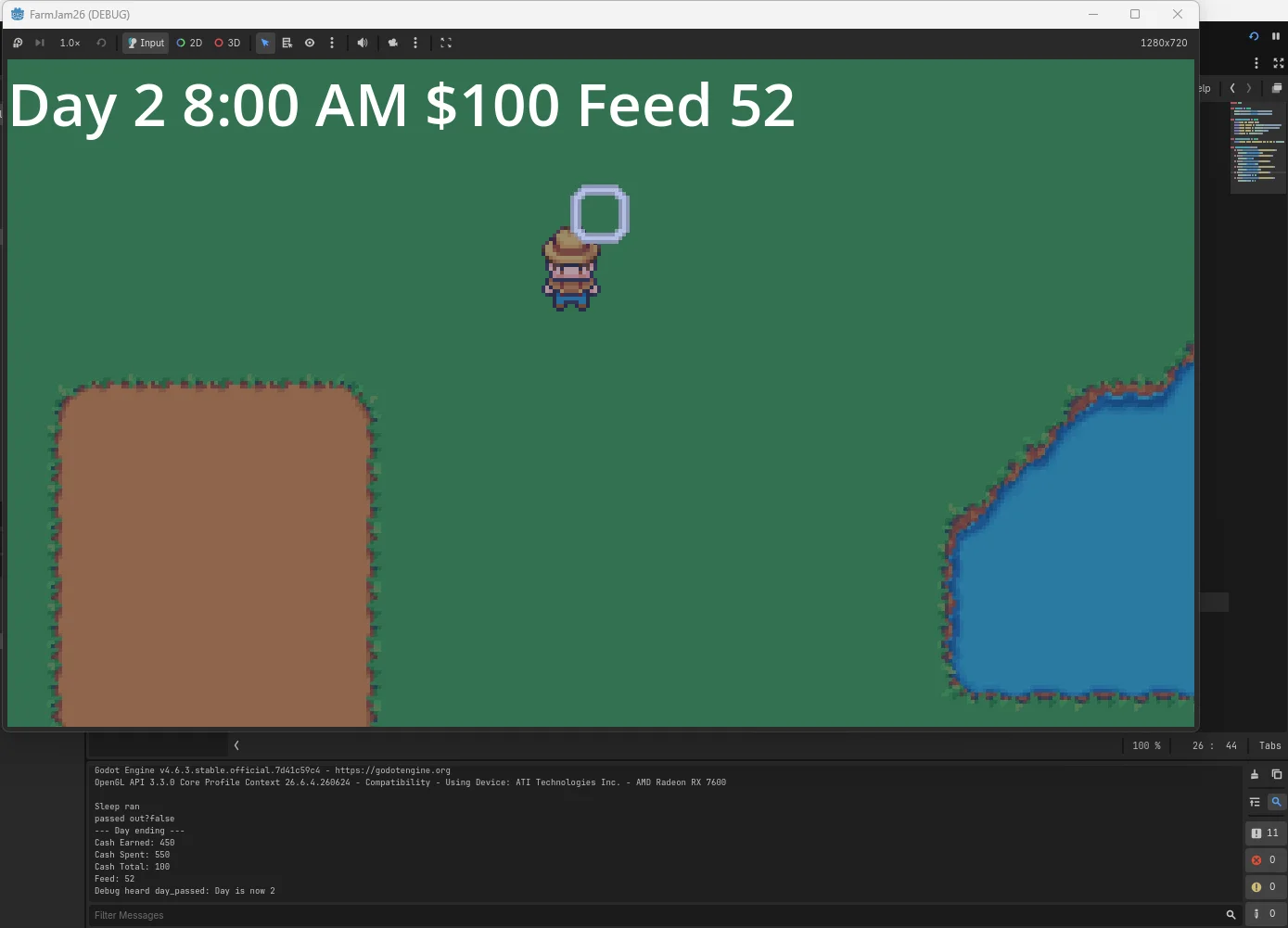
I setup a tile highlighter that checks against the players positioning to confirm if the player is able to reach a tile for interactions. This cursor changes red when something is out of reach. At first I wasn't sure if I wanted to go the action button on a tile in front of the player route (similar to Harvest Moon 64) or let the player interact via mouse within a set parameter around themselves closer to what Stardew Valley does. I decided for user experience, the mouse interaction was best. I set this up to print a log with the interacted on tile for now.
This wasn't without its headaches however.. I'll dive into that below.
Animations:
I setup player idle and walk animations in each direction within an AnimatedSprite2D node. I also built out movement on the player but didn't wire up the animations just yet.
Introduction Animation:
Similar to the Godot splash screen when you launch a game made with Godot, I wanted a "introduction" animation for myself. I thought having something with my name on it would seem off so I came up with a quirky "studio" name for myself whenever I enter these jams going forward. I decided to pull from my coffee hobby and named my "studio" Brewed Bean Games. I setup a quick animation in Aseprite and did surprisingly well given the fact that my art skills are sub-par. I made sure this was skippable as well.

Main Menu:
Nothing fancy here yet, just a grey screen with a start and quit button.
End of Day 1
That was the end of "Day" 1, just a handful of hours from 11:00 PM to 4:00 AM the next day but I got quite far. It was late/early so I called it a night to rest up for the next day.
Day 2 - 7/15 @ 8:00 PM EST
Day two started off later than I had intended, between work during 9-5 and things around the house I didn't really get situated properly until around 8:00 PM. Thankfully that didn't really stop my momentum much.
Picking up where I left off the day before I dove straight in.
I synced up with my audio tech to give him the kind of feel we were going for and watched him crank out 2 full soundtracks for the game in under 10 minutes. I have no idea how he does it but he nailed the feel we're going for with minimal direction.
What actually got built on day 2
Game State:
Setup a script to handle game state for things such as cash, day, minutes, feed count, reputation. The clock is an integer counting minutes from midnight, so the day starts at 480 minutes which translates to 8:00 AM and ends on 1320 minutes which translates to 10:00 PM.
Within game state I setup a few helper functions to add and remove cash, calculate cash earned and spent for that day, remove minutes from day, sleeping, passing out and the time penalty that entails, resetting these values where and when necessary, and wired up some debug keys to test it all. I then wired this up to the Events script I built out yesterday to emit the signals necessary based on the actions taken.
Wired Player Animations:
As the title says, I took those animations I setup on day one and wired them to player actions based on last direction and velocity x and y. We now have a fully animated player.
Day/Night Cycle:
Using the game state script to pull time of day, I setup a CanvasModulate with a gradient that changes the position based on what time it is from a cool dewy morning, sunrise, midday, sunset into a dark and cool night.
Debug UI:
I setup debug UI elements to allow in-game visibility of time, day count, cash flow and feed count.

Bugs I've hit so far
Now for my mistakes, the fun part of doing this is learning.
The Farmers Hat:
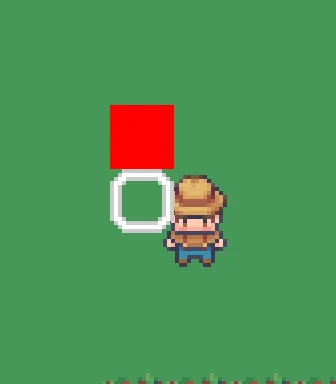
For my mouse based interaction handling, my range was wrong. I couldn't reach the tile directly below the farmers feet but I was able to reach two tiles above my head no issues.
This was off, with the way I had the reach setup, I should be able to reach 2 tiles in any direction of myself but somehow I couldn't even reach below the farmer sprite.
The LimeZu character frames are actually 48x64 with the character drawn at the bottom. Godot's AnimatedSprite2D centers the frame on the node's origin. So the origin was sitting 32 pixels above the farmers feet, and my "which tile am I standing on" check was reading the tile at his hat instead.
The fix ended up being simpler than I thought but doesn't make it any easier to find when you're learning as you go. I just had to set an Offset of (0, -32) on the sprite, which moves the picture up while leaving the origin at the feet where it belongs.

The Boundary issue:
So I fixed the interaction problem right? Wrong.
I fixed the origin but the interaction was still broken but for a different reason now. I setup a tile marker to show me what tile it was using to determine reach and noticed that the tile marker jittered when the player moved diagonally, and the reach was off by one in a way that changed as you continue to move.
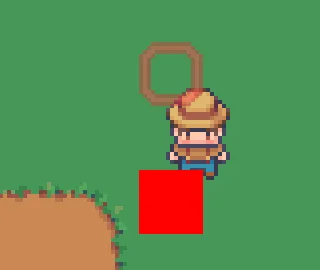
The feet were landing at exactly y = 16 * some_integer. Precisely on a tile boundary.
local_to_map floors, so a sample point sitting exactly on the seam flips between two tiles with sub-pixel movement.
The fix? Sample from 8 pixels up, which is the center of the tile the player is standing in. Now you have to move a full half tile before the resulting tile marker changes instead of a fraction of a pixel.
Lights, Camera, Earthquake?:
I had setup my camera on day 1 and continued on without much of a thought but after setting up and wiring the player animations properly I noticed the sprite seemed extremely jittery in movement. Turns out the feature toggle called "Position smoothing" within the Camera2D node was the culprit. Similar to the boundary issue above, at my viewport a smoothed camera lands on fractional pixel positions causing the entire character sprite to shake like they're in an earthquake. So contrary to it's name, turning off "position smoothing" actually made things smooth.
Where do we stand against the timeline
According to my own design doc and Trello board, even with the delay in start on day 2, I'm somehow 3 almost 4 days ahead of schedule. I've completed all the tasks I had assigned for days 3 and 4. Going forward I'm introducing height to the map, collision to objects, animals and interactions. I may upload a sloppy version of the game to Itch on Day 5 but for now things are going much smoother than any prior jam has in the past and I'm feeling pretty accomplished with what I've gotten done so far.
That's it for this first dev log, see you in the next one!